1
Start with the grading plan
A prepared civil sheet shows the scale, contours, spot elevations, pad, pond and limits used by the example.
SMART CONSTRUCTION MANAGEMENT PLATFORM
Bring source-linked intelligence, CAD & BIM, field records and project controls into one TRACE workspace—from the first drawing to final handover.
FOR PUBLIC OWNERS · CONSTRUCTION MANAGERS · CONTRACTORS
EXPERIENCE TRACE
Explore the actual interface through a limited demo account, or book a working session for project controls, risk management, CAD & BIM and advanced workflows.
SELF-RECOVERY
TRACE applies defined recovery rules to known failure states—stale work, interrupted processing, duplicate requests and quarantined inputs—while protecting the integrity of the project record.
When TRACE cannot establish that a write is safe, it refuses the write and records the condition for authorized review.
TRACE PROJECT INTELLIGENCE
TRACE connects schedule freshness, response clocks, contract coverage and evidence gaps in one explainable project-condition view. The gauge shows where attention is needed; the records below it show why.

PRE-CONSTRUCTION & PROCUREMENT
TRACE gives owners, public agencies and construction managers one governed path to define project requirements, collect evidence, route accountable signatures and hand the cleared record to the project manager.
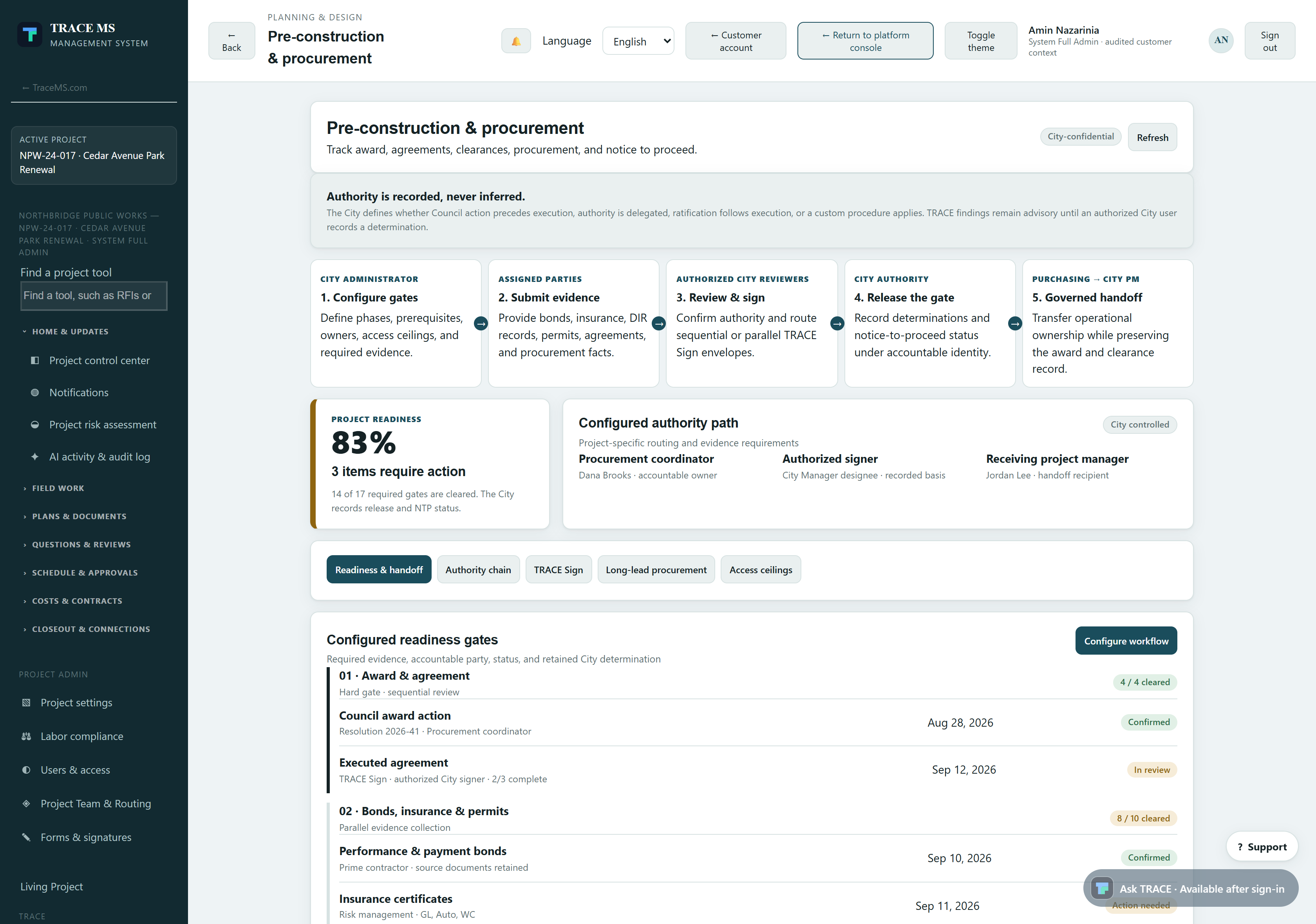
Authority is recorded, never inferred. TRACE presents project records and routes accountable decisions. The authorized owner or agency records applicability, acceptance, gate release and Notice-to-Proceed status.
SEE IT IN TRACE
See the TRACE workspace behind this capability, with its related navigation expanded and the project record in view.
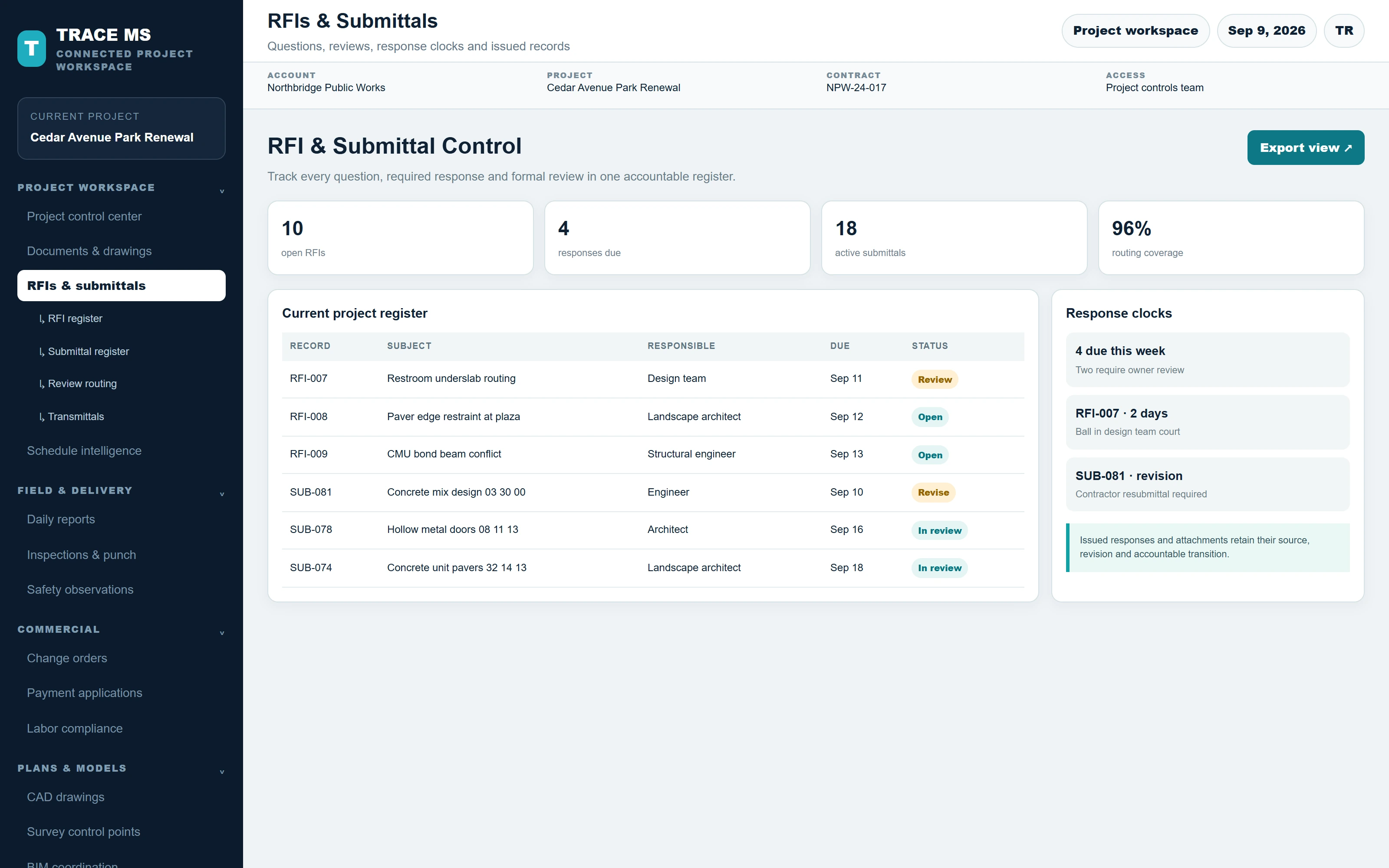
TRACE screens use controlled sample-project records; the survey-points view is captured from the existing grading drawing in the TRACE walkthrough. Every screen scales to the device width.
Search 731 documented capabilities across 58 sections, plus the current license options. Available, conditional and development items retain their scope notes.
58 capability sections · 731 documented entries · 34 license options
An organized workspace for owners, public agencies, construction managers, designers and contractors.
Manage profile, password, organization identity and branding.
Create and open authorized projects; review active, closeout, archived and permitted trash views.
Use portfolio summaries and project selection to reach the right job.
Access project tools, current work, updates and available records from one starting point.
Use grouped navigation for home, field work, plans, reviews, schedules, costs and closeout.
Search navigation labels to locate a supported section quickly.
Open common records through account/project shortcuts.
See customer, project and current authority so actions are taken in the right workspace.
Assign participating organizations, project team members, roles and effective permissions.
Review notifications, assigned actions and AI activity/audit information.
Use contextual guidance and available interface language options.
Configure licensed project, organization and person-level access; device enrollment and operating-system permissions remain separate.
Scope and availability: Module visibility depends on licensing and effective permissions. Device access follows the applicable client, browser and operating-system requirements.
Open the complete 731-entry source register (PDF) ↗Keep responsibility, review authority and record history explicit.
Maintain the job identity, participating parties and supported administrative settings.
Record contract details, notice to proceed and the relevant review/payment clock inputs.
Configure responsible organizations and supported review routes for each record type.
Separate creating, submitting, responding, reviewing, verifying and approving according to effective authority.
Identify the current responsible party and workflow state.
Use supported route and approval semantics with accountable transitions.
Preserve earlier route steps and decisions when a current route is amended.
Bind supported certifications and finalized records to their content identity and attribution.
Create eligible correction revisions while preserving original sealed RFI/submittal content.
Use configured templates and supported signing workflows with required fields and signing authority.
Retain attributable record and status history across governed workflows.
Scope and availability: Routes differ by record type and project configuration. A content seal records identity and attribution, not the correctness of an engineering judgment.
Open the complete 731-entry source register (PDF) ↗Bring supported project records into a current, permission-aware investigation workspace.
Combine authorized RFIs, submittals, schedules, drawings, field observations and available energy records.
Show the age and coverage of available information rather than implying complete live awareness.
Identify supported missing answers, references, assignments and review information.
Prepare source-linked next-step drafts from selected findings.
Control eligible monitoring and learning through authorized opt-in settings.
Retain scan progress and handle eligible retry, resume, pause and stalled work.
Record accountable adjudications with source-version context.
Evaluate supported candidates against later records before adoption.
Activate supported tested workflow patterns under owner control.
Explore bounded imported-network scenarios and retain assumptions and calculation evidence.
Record energy, fuel and demand separately with units, time and source attribution.
Scope and availability: The Living Project workspace and the asset/sensor intake are complementary foundations. They do not currently constitute a fully synchronized operational digital twin.
Open the complete 731-entry source register (PDF) ↗Additional setup, commercial handoff and exchange functions included in the reviewed platform.
Record supported sector, delivery method, contract duration and site coordinates.
Associate clock settings with the applicable source and delivery-evidence requirements.
Use eligible trash/recovery controls alongside archive and lifecycle permissions.
Track readiness, award/agreement clearances, authorities, organization policies and follow-ups.
Maintain supported procurement-item tracking and mobilization/NTP handoff information.
Record supported source calibration and measurements before relying on derived quantities.
Retain supported source-basis information with controlled estimate publishing and handoff.
Record acceptance/rejection, supported mappings, activity data and analysis history for imported versions.
Review payment-application findings and prepare supported accountant exports.
Maintain supported mappings, dry runs, approved exchange and reconciliation; an external provider must be configured and supported.
Use supported cross-project summaries and export under effective account access.
Apply licensed project, organization and person-level controls to eligible field-client operations.
Scope and availability: Configured agreements and signatures are not an unrestricted legal contract-authoring system. Generalized Workflow Studio, fleet/GPS intelligence and comprehensive offline resilience are not established by these functions.
Open the complete 731-entry source register (PDF) ↗Deployed on-demand foundation; its evidence compilation is distinct from a fully verified digital twin.
Compile accessible schedule, labor, change, billing, meetings, permits, safety, quality, daily and integration record state.
Distinguish facts about stored records from assertions in those records, unsupported proof and restricted registers.
Provide scoped database references with explicit unsealed status and bounded per-register coverage.
Distinguish submitted schedule versions from the recorded accepted schedule of record.
Expose absent records and domain evidence that has not yet been verified.
Prepare reversible proof-request text with the current brief attached only for an authorized preparer; no automatic sending or record insertion.
Download state, references, refusals, authority and draft/refusal as JSON with a payload SHA-256 fingerprint, not a digital signature.
Refresh state, reject stale results and explain restricted access without inferring authority from an administrator title.
Scope and availability: Continuum continuous compilation and integrated sealed-evidence verification are separate unfinished work. The released contract workspace has its own signed journal and portable archive; that does not automatically complete their integration into Continuum.
Open the complete 731-entry source register (PDF) ↗Recent public-demo and account-reuse development.
Prepare one coherent fictional park/restroom project with linked construction records.
Populate ten fictional RFIs with supporting sample PDFs and source relationships.
Include CMU, concrete, doors, pavers and drinking-fountain submittal examples.
Provide labeled transmittal covers and a draft pay-application summary.
Populate multiple detailed change orders linked to the synthetic project story.
Populate baseline/update and look-ahead examples for read-only exploration.
Populate candidate permits and a multi-item field walk with related evidence.
Link fictional procurement items to submittals/activities and populate budget lines.
Assign and date the prepared preconstruction checklist in the demonstration.
Process the fictional BIM model through TRACE extraction; the recorded demo has geometry for 49 modeled objects.
Candidate visitor controls deny uploads, mutations, processing, live AI execution and unauthorized account-directory access.
Candidate visitor registration, verification, expiration and functional-demo request forms remain under integration acceptance.
Audit meaningful contents and detail views across 38 project sections; an HTTP success alone does not close the section.
Track section guidance, examples and training-video gaps separately from the sample data.
Recorded staging acceptance exports/imports a blueprint into a new tenant with empty destination business records.
Validate independent destination publication, authorized writes, suspended writes and cross-tenant denials.
Accepted on current isolated staging: expired setup link denied, normal password setup and correct-tenant login passed, and reused setup POST was rejected.
The corrected same-origin /app.html navigation passed normal-browser acceptance, including original-password login after attempted setup-link reuse and logout.
The synthetic project has an accepted-for-training MS Project XML revision with 25 activities, 34 finish-to-start links and 66 working days; the actual risk builder consumes it.
The real extraction produced 49 geometric products and 52 hierarchy/element records, published inside the synthetic project.
The newest demo additions include seven indexed PDFs totaling 18 pages, four plan sheets and four drawing images.
The demo owner corrected folder ownership and verified 46 of 46 files readable by the web-service user.
The synthetic project and records exist in a separate live tenant. Public visitor signup/access, full section acceptance and training remain separate work.
Scope and availability: The shared public visitor experience remains in preparation at this checkpoint. Synthetic examples are not customer work, physical inventory or completed approvals.
Current update (September 9, 2026): the shared synthetic project is now published through private, seven-day, read-only visitor sessions. Uploads, edits, processing and live AI execution remain disabled. This supersedes the earlier preparation checkpoint in the source register.
Open the complete 731-entry source register (PDF) ↗Evidence-grounded assistance for construction administration, investigation and preparation.
Ask typed or voice questions, including informal wording and follow-ups. Choose quick lookup, an answer with sources or detailed investigation; edit scope-specific suggested questions before sending.
Find screen guidance, navigation help and explanations of supported workflows through a separate product-help knowledge base.
Use authorized project documents and supported structured records as evidence for project questions.
Separate recorded facts, inferred consequences, assumptions, competing evidence and missing information.
Explain supported implications, highlight missing logic, calendars or baselines, and propose a next verification step.
Attach source references to supported findings; identify insufficient evidence rather than invent a project determination.
Supported queued assistance tasks prepare material in an authorized record context, subject to evidence and access controls.
Keep formal engineering, safety, legal, approval and permission-to-build decisions with the authorized person.
Retain AI activity, run identifiers, source context and supported review/feedback information.
Recover eligible long-running requests with the same request key and avoid duplicate model calls for repeated submissions.
Use supported voice entry/output subject to browser, device permissions and configured service availability.
Scope and availability: AI availability depends on the enabled module, configured provider and usage allowance. Fluent output is not evidence of correctness.
Open the complete 731-entry source register (PDF) ↗Source selection is enforced before evidence reaches the reasoning model.
Restrict retrieval to the current authorized tenant and project, with matching source and passage identity.
Search eligible shared reference material without carrying project context into that search.
Use the authorized project plus separately identified general references; do not mix in another project.
Project-only and combined project-bearing prompts do not use public web research. Permitted general research is a separate path.
Distinguish project records, reviewed references, general guidance and assertions; a reference is not automatically a governing requirement.
Retain available edition, jurisdiction and applicability metadata so the user can establish the controlling source.
Apply current access rights to records and evidence, including API and queued worker paths.
Clear prior questions, answers, citations and voice state when changing source scope.
Reject stale results after account, tenant, project, source-mode or relevant revision changes.
Keep failure curricula scoped and private; do not turn one customer's questions or project documents into another customer's knowledge.
Scope and availability: Shared general references and project-private evidence remain distinct. General references must be evaluated for actual project applicability.
Open the complete 731-entry source register (PDF) ↗Turn supported files into inspectable evidence while preserving their source identity.
Extract supported born-digital documents into searchable passages with source and page context.
Retain extraction method, page identity and available confidence/region metadata for scanned notes and images.
Retain native PDF page numbering and layout-oriented text; open the original PDF page to verify tables, symbols and context.
Use content fingerprints and revision links to identify the exact evidence used.
Search relevant passages and supported structured project facts rather than treating all text as equally authoritative.
Open available source references and inspect the cited passage or original document.
Collect supported answer evidence into proof items for review and communication.
Preview, print or download supported exhibits, reports and source manifests.
Apply supported file validation, scanning and ingestion gates before protected evidence becomes usable.
Validate candidate hashes, page counts, page identity, empty/missing pages, safe paths and provenance metadata.
Add eligible references through extraction and quality review; preserve approval states and edition metadata.
Scope and availability: Layout-oriented text does not preserve every visual relationship. OCR alone does not establish dimensions, scale, linework or design intent.
Open the complete 731-entry source register (PDF) ↗The deployed reference expansion includes eight complete retained federal publications, totaling 524 PDF pages, plus 24 original TRACE workflow guides.
UFC 3-501-01: electrical engineering reference material with page-linked source access.
UFC 3-410-01: heating, ventilation and air-conditioning reference material.
UFC 3-201-01: civil engineering reference material.
UFC 3-420-01: plumbing systems reference material.
UFS 3-740-05: construction cost-estimating reference material.
UFGS 01 32 01.00 10: project schedule guide specification.
UFGS 01 45 00: quality-control guide specification.
UFGS 01 35 26: governmental safety requirements guide specification.
Eligible existing Greenbook and selected OSHA reference records remain subject to their recorded rights, readiness and approval states.
Original TRACE guidance explains common processes. Eligible exact guide matches can return cited guidance without a model call; the complete title index appears later in this document.
Retained editions, original PDF links and extraction provenance identify what is actually in the deployed pack.
Scope and availability: This is not an all-codes library. Referenced commercial standards are not included by reference. Full OSHA, FHWA and GAO libraries were not added by this expansion; full Greenbook fidelity was not newly certified.
Open the complete 731-entry source register (PDF) ↗Prepare the next step while keeping issuance, approval and contractual decisions under human control.
Investigate a question using authorized evidence and prepare supported wording or next-step guidance.
Generate an editable follow-up from the current RFI and workflow record; nothing is automatically sent or issued.
Prepare a structured review draft tied to the current record, with missing evidence left visible.
Rewrite submitted daily notes into an editable narrative with fact-preservation checks.
Use cited assistance to prepare questions and review material alongside the separate accountable submittal workflow.
Use supported drafting assistance with authorized context; review the controlling clauses and factual basis before use.
Prepare source-linked drafts from selected evidence gaps for an authorized reviewer.
Propose and evaluate bounded read-only investigation patterns from reviewed outcomes before owner activation.
An AI draft or recommendation does not itself approve a submittal, close an inspection, issue a notice or change the contract.
Scope and availability: A follow-up template is not an autonomous legal analysis. Autonomous bid-protest issuance and a comprehensive automated technical submittal compliance matrix are not delivered claims.
Open the complete 731-entry source register (PDF) ↗Interpret recorded project conditions and make missing inputs visible.
Review supported project risk evidence, record context and identified gaps.
Show cumulative 7-, 14- and 30-day RFI/submittal review due horizons in the authorized confidential assessment.
Identify overdue, undated and aged actions without inventing missing deadlines.
Keep RFI and submittal completion rates separate, respecting current route cycles and parallel approvals.
Estimate remaining review workload only when the required positive completion history exists for each active record type.
Require at least eight positive completions spanning three of four weeks for each active type; return unavailable when the evidence is insufficient.
Exclude returned, rejected and future completions from the positive completion basis.
Highlight missing or stale accepted schedule evidence.
Read current structured workflow and schedule records when the assessment refreshes.
Keep confidential forecasts out of shared/compact views and reject results for a previously selected project or period.
Scope and availability: These are descriptive workload scenarios, not trained delay probabilities, proof of physical progress, legal causation or a guarantee of future performance.
Open the complete 731-entry source register (PDF) ↗Use selected images and a specific plan page to prepare a traceable visual review.
Submit supported field images and select the relevant PDF plan page for comparison.
Bind the review to the source plan revision and selected page rather than an unspecified drawing set.
Use the configured vision provider to analyze the selected image evidence and plan page together.
Present supported observations, uncertainty and information requiring field confirmation.
Retain the source references and review output with the authorized record context.
Add accountable review information rather than treating a visual suggestion as an accepted field determination.
Validate the provider's structured response, required shapes and completion state before admitting a result.
Use file and page extraction gates; preserve access boundaries across upload, analysis and replay.
Prevent a previous project's visual result from replacing the current view.
Scope and availability: Delivered scope is assisted review of selected inputs. Automatic drone-feed monitoring, survey registration, measured alignment deviation, soil-condition diagnosis, automated takeoff from photos and certified installed-work verification are not established.
Open the complete 731-entry source register (PDF) ↗Improve selected workflows through measured, controlled changes rather than autonomous foundation-model training.
Collect bounded failure signals into private, scoped evaluation curricula.
Use run references rather than publishing raw customer questions into shared learning material.
Evaluate fixed retrieval aliases for the original public workflow guides.
Compare a candidate on separate labeled cases before activating it.
Require preservation of previously passing cases for the eligible vocabulary candidate.
Avoid repeatedly tuning identical experiments against the same holdout; reject stale fingerprint selections.
Record source-versioned human outcomes for selected administrative findings.
Evaluate selected priority/calibration changes against later, different records before owner activation.
Test bounded investigation patterns before activating supported read-only workflows.
Process bounded scans, retain progress and recover eligible stalled work with retries, pause and health information.
Require the applicable authorization for activation, monitoring and return to baseline.
Scope and availability: No autonomous model-weight training or unrestricted self-modifying code is deployed. Continued improvement needs maintained sources, new validated candidates and evaluation; it is not guaranteed every day or year.
Open the complete 731-entry source register (PDF) ↗Deployed additions verified in the interpretation, schedule-reasoning, research and RFI release records.
Handle typos, shorthand, alternate meanings and standard-family hypotheses while retaining the original question.
Consider sequence, staging/access, crews, equipment, procurement, temporary works, testing holds, permits, handoffs, mitigation and counterevidence when supported.
Explain a standard as general guidance without requiring project adoption; keep binding project determinations separate.
Eligible general questions may continue to official public research when related local passages still cannot answer the question.
The documented difficult-general-research fallback uses gpt-6-astra after the primary provider cannot release a cited answer; this is an application component, not a TRACE-trained foundation model.
Validate citation ranges and Unicode offsets; reject incomplete provider output and unsupported assertions rather than releasing partial text as verified.
Distinguish research actually attempted from a setting merely being enabled; record provider usage and cost.
Provide authorized baseline/latest revision, disposition history, methodology, bounded activities/relationships, import assumptions and exact-version comparisons.
Examine overlapping delays, mitigation and completion impact; distinguish calendar days from working-time float and request missing CPM evidence.
Read saved XLSX/PPTX chart series, categories, values, labels, number formats and formula references. Do not evaluate formulas or follow external links.
Load subject, question and references from the authorized RFI ID; preserve linked follow-ups only while that project and RFI remain active.
Show proof, collect all eligible references, prevent duplicates and print answer proofs through an in-app preview.
Export supported complete text, tables, technical symbols, citations and eligible original source-page images without depending on the browser print dialog.
Reauthorize indexed passages; distinguish archived source evidence from public URL references that have not been archived.
Serialize/replay eligible requests by authenticated user and submission key; reject key reuse for a changed question and avoid duplicate model calls.
Scope and availability: Known limits include intermittent P6 answer-release failures, variable research latency, and saved chart caches that can be stale. These are not guarantees of universal answer accuracy.
Open the complete 731-entry source register (PDF) ↗Implemented opt-in administrative improvement; activation and usable evidence are prerequisites.
Retain explicit source-versioned human adjudications and append-only corrections within the project.
Evaluate on later unseen records rather than reusing the same source in training and testing.
Apply minimum distinct-record and reviewer-diversity/concentration requirements before eligible candidate promotion.
Compare eligible ranking candidates against baseline/current behavior, including per-kind regression and Brier-score checks.
Refuse candidate promotion from truncated history beyond the supported 2,000-review cap.
Invalidate dependent learning when source evidence is corrected or access is revoked.
Keep candidate activation explicit and permit return to the baseline.
Propose read-only investigation patterns from repeated substantiated outcomes; test later reviewed records before owner activation.
Use bounded source generations, durable cursors, fenced leases and atomic finding/checkpoint writes.
Process due projects with fresh authorization, retry/pause behavior and owner opt-out; do not treat platform support as unattended authority.
Compare supported paired readiness/duration scenarios and identify the next fact that reduces remaining uncertainty.
Scope and availability: Learning currently covers selected administrative RFI/submittal finding kinds. Metrics are observational and exposure-biased, not foundation-model retraining, physical verification or guaranteed improvement.
Open the complete 731-entry source register (PDF) ↗Detailed implementation distinctions retained from the AI audit.
Offer bounded follow-up choices for broad construction questions without reading private evidence or spending model tokens.
Retrieve authorized daily, job-walk, quality, safety and time-record facts with operational citations.
Include clock settings only with explicit source, day count and working/calendar basis; do not substitute unsourced settings for contract terms.
Distinguish retrieval relevance from controlling authority, effective time, jurisdiction, project area/system/phase and amendment effects.
Retain exceptions, conditions, alternatives and supersession alongside direct matches; a classifier alone does not establish a legal conflict.
A separately configured reviewer can assess a draft against its cited passages without browsing, retrieving new evidence, adding citations or executing actions.
Capture corrections, rejections, no-match and escalation signals into a scoped curriculum. This shadow layer does not itself change live answers.
A fixed 31-alias candidate improved one small held-out top-topic evaluation from 14/18 to 15/18 while preserving eligible passing cases; this is not general answer accuracy.
Bind eligible activation to pack, dataset, algorithm and registry identities; corrupt or stale state falls back to baseline.
Count any-one review groups once at the earliest due action, all-required groups separately, and exclude inactive future steps.
The resource-recovery planner supports bounded unstarted fixed-duration DAGs with FS/nonnegative lag and ASAP/SNET releases plus explicit calendars. Unsupported SS/FF/SF, actual progress, splitting, overtime and inferred productivity are refused.
Rewrite supplied daily notes in English or Spanish while preserving facts, numbers, negations and uncertainty; do not add unsupported blame or causation.
Gemini, Grok and Claude consultations helped development reviews; they are not established as a three-provider vote on every customer answer.
Scope and availability: Reference extraction is automated rather than named human fidelity review. Attempted but blocked GAO, OSHA 3886 and USACE CQM source downloads were not ingested. UFS is a nonmandatory reference and UFGS documents are templates requiring tailoring/adoption.
Open the complete 731-entry source register (PDF) ↗Integrated customer-panel viewing and review controls; original source files remain preserved.
Open supported authorized PDF/image documents inside TRACE, navigate available pages and download the original.
Choose a current-project DWG and exact version, then open the converted drawing inside BIM without requiring an external CAD application for the supported review functions.
Select entities, search source handles, pan, zoom, fit, switch layers, restore converted visibility, add notes, draw polylines and measure approximate XY distances.
Orbit, pan, zoom and fit source XYZ line/point geometry; apply explicit Z-range, zero-Z and vertical-display controls. The 2D layer switches do not automatically filter this XYZ view.
Select one actual POINT layer, build the shaded surface, inspect low/high colors, toggle points/wireframe and apply maximum-edge and display-scale controls.
Use object tree/search, picking, selected-object fit, isolation/show-all, top/front orthographic views, isometric perspective, X/Y/Z section cuts, wireframe and reset.
IFC-derived GLB is served as a checked derivative; this does not establish arbitrary public GLB/glTF upload support or automatic mapping of every mesh to an IFC element.
Select actual points or separate block anchors, inspect original XYZ, export/print chosen rows and label a selected actual point as an unverified reference marker.
Bind viewing, annotations, evidence links and geometry to source/version fingerprints; reject stale or mismatched outputs.
Apply current source cleanliness, status, license and actor permissions; IFC publication and provisional CAD review remain distinct workflows.
Dispatch bounded native extraction, use private identity-bound caches, report supported/omitted geometry and recheck access after processing.
Prepare supported drawing, elevation, surface, coordinate and document-page outputs with applicable source identity, units and display settings.
DWG and IFC/IFCZIP have production review paths. PDF/images use document/markup paths. The richer direct DXF/3DFACE successor has accepted isolated staging integration; native RVT/DGN/SKP and arbitrary format conversion still require separate work.
TRACE review annotations do not rewrite the DWG/IFC design. IFC dimensioning, capped section solids, survey-certified benchmarks and approved final grading are not supplied merely by viewing.
Scope and availability: This is TRACE's internal review viewer/controller, not a full AutoCAD/Civil 3D/Revit authoring replacement. Section cuts are uncapped; camera ground/shadows are display aids, and geometry completeness remains source-dependent.
Open the complete 731-entry source register (PDF) ↗Implemented release with 155 passing tests: 112 PHP tests (384 assertions), 37 voice tests and six browser fixture tests; TypeScript typecheck also passed.
The response queue now waits while the caller speaks, coalesces overlapping turns and supports caller interruption. The user reported the real-call test passed as natural and responsive.
Explicit official-source requests bypass the original workflow-guide shortcut; literal exclusions of project records are respected while private identifier protections remain in place.
The tested RFI question returned official public-web citations to USACE CQM guidance and Caltrans Source Inspection Guidelines, with no project records used.
Get help now provides four current workflow guides, typed product guidance, clear source labels, retained inputs/errors and a human-ticket handoff path.
Web and telephone guidance covers My Apps/App Factory, Undo/Redo, loading, support, training and billing boundaries.
Completed a private cycle containing seven failure signals, two scoped curricula and two new versions. No model weights, live answer behavior or promotion changed; no autonomous training.
A read-only, secret-free check identifies missing merchant credentials, webhook configuration and plan setup. Live paid launch remains blocked pending configuration and financial acceptance.
Support guidance no longer triggers a legacy acceptance toast; topic selection does not approve or seal a project record.
Scope and availability: The real-call result is one user-reported acceptance, not two independently identified calls or a statistical audio benchmark. Live research is a tested example, not universal accuracy. Human handoff is a ticket path, not a continuous staffing promise. No live charge, refund or subscription was attempted.
Open the complete 731-entry source register (PDF) ↗Retained 24-guide pack; these are original workflow explanations, not adopted contract requirements.
Original TRACE guidance available to eligible workflow retrieval.
Original TRACE guidance available to eligible workflow retrieval.
Original TRACE guidance available to eligible workflow retrieval.
Original TRACE guidance available to eligible workflow retrieval.
Original TRACE guidance available to eligible workflow retrieval.
Original TRACE guidance available to eligible workflow retrieval.
Original TRACE guidance available to eligible workflow retrieval.
Original TRACE guidance available to eligible workflow retrieval.
Original TRACE guidance available to eligible workflow retrieval.
Original TRACE guidance available to eligible workflow retrieval.
Original TRACE guidance available to eligible workflow retrieval.
Original TRACE guidance available to eligible workflow retrieval.
Original TRACE guidance available to eligible workflow retrieval.
Original TRACE guidance available to eligible workflow retrieval.
Original TRACE guidance available to eligible workflow retrieval.
Original TRACE guidance available to eligible workflow retrieval.
Original TRACE guidance available to eligible workflow retrieval.
Original TRACE guidance available to eligible workflow retrieval.
Original TRACE guidance available to eligible workflow retrieval.
Original TRACE guidance available to eligible workflow retrieval.
Original TRACE guidance available to eligible workflow retrieval.
Original TRACE guidance available to eligible workflow retrieval.
Original TRACE guidance available to eligible workflow retrieval.
Original TRACE guidance available to eligible workflow retrieval.
Scope and availability:
Open the complete 731-entry source register (PDF) ↗Eight retained publications totaling 524 PDF pages. Editions below describe the retained pack, not a claim of current editions.
27 November 2024; 96 PDF pages; https://legacy.wbdg.org/FFC/DOD/UFC/ufc_3_501_01_2024.pdf
28 July 2025; Change 1, 23 January 2026; 63 PDF pages; https://legacy.wbdg.org/FFC/DOD/UFC/ufc_3_410_01_2025_c1.pdf
20 December 2022; Change 1, 1 June 2026; 68 PDF pages; https://legacy.wbdg.org/FFC/DOD/UFC/ufc_3_201_01_2022_c1.pdf
1 April 2021; 72 PDF pages; https://legacy.wbdg.org/FFC/DOD/UFC/ufc_3_420_01_2021.pdf
2 February 2026; 112 PDF pages; https://legacy.wbdg.org/FFC/DOD/UFC/ufs_3_740_05_2026.pdf
August 2026; 24 PDF pages; https://legacy.wbdg.org/FFC/DOD/UFGS/UFGS%2001%2032%2001.00%2010.pdf
August 2023, Change 4 August 2026; 51 PDF pages; https://legacy.wbdg.org/FFC/DOD/UFGS/UFGS%2001%2045%2000.pdf
May 2024, Change 2 August 2026; 38 PDF pages; https://legacy.wbdg.org/FFC/DOD/UFGS/UFGS%2001%2035%2026.pdf
Scope and availability:
Open the complete 731-entry source register (PDF) ↗Released advisory assessment controls added after the previous catalog.
Split complete answer paragraphs and printable findings into server-created, hashed review units.
Include finding titles and applicability text in review rather than examining only selected snippets.
Return one review result per unit with source references, claim kind, assertion polarity and prerequisite states.
Reject omitted, duplicate or unknown units and evidence references outside the supplied source set.
Represent each condition as supported, contradicted or unknown; unknown does not become satisfied.
Require all stated prerequisites to be supported before releasing a positive assertion that they are met.
Allow an honest statement that acceptance or applicability is unproven without treating it as a positive claim.
Require each material summary or finding to retain its relevant conditions; another paragraph cannot silently repair an omission.
Block truncated answers and materially unanswered requests through explicit completeness review.
Avoid converting a reported execution or relevant document into verified incorporation, approval or controlling authority.
Do not infer that terms are legally nonbinding merely because their adoption evidence is absent.
A narrow guard checks identified suspension statements for supported notice and undisputed-invoice qualifications.
Supply passage text, source hashes, passage hashes and page locators to the reviewer.
Retain unit hashes, prerequisite outcomes, evidence references, expected counts and reviewer details.
Turn observed truncation, omitted conditions, false authority promotion and incorrect refusal into regression cases.
Claude, Gemini and Grok reviewed anonymized supplied sources and corrected reference wording; their acceptance applies to that wording, not certification of TRACE software.
The recorded final suite passed 19 adversarial reviewer cases and a complete live assessment; software checks covered 91 tests and 305 assertions.
Name the missing or governing records and the authorized person's next verification action before consequential decisions.
Scope and availability: Semantic interpretation remains model judgment. This is evidence-backed advisory assistance, not guaranteed legal correctness or an autonomous construction manager.
Open the complete 731-entry source register (PDF) ↗Organize files, drawings and daily records around their project context.
Upload, organize and retrieve authorized project files with source identity and extraction status.
Register plan sets and sheet records, including supported proposals from uploaded documents.
Review proposed sheets and bulk-register supported records with attribution.
Retain prior sheet versions and formal review context.
Select a supported PDF/image page, annotate it and use the authorized sharing workflow while preserving original bytes.
Compare extracted statements and metadata between authorized revisions of the same sheet.
Store project images and attachments with content provenance.
Capture field work, labor/equipment context and supporting media in the daily record.
Use supported signature/seal workflows and append corrections rather than overwriting finalized content.
Use project-coordinate forecasts, the current weather bar, ten-day outlook and source-linked weather notices.
Produce a deterministic cited position statement from supported sealed records and contract clocks, including freshness and explicit unknowns.
Scope and availability: Text comparison does not compare all pixels or geometry. Forecasts are external observations, not proof that work was weather-delayed.
Open the complete 731-entry source register (PDF) ↗Additional document, knowledge and field-record tools included in the platform inventory.
Upload eligible reference sources, track ingestion and manage source versions under the applicable authority.
Review extraction/readiness and verification status before eligible material is used as grounded evidence.
Maintain supported relationships between references and preserve provenance context.
Apply supported document/source classifications in addition to tenant and project permissions.
Keep unsafe or unready uploads out of the usable evidence path and expose supported status information.
Use supported large-file upload handling for project media.
Maintain descriptions, location metadata, collections, evidence links and previews.
Archive and restore eligible media under current authority.
Retain supported daily field records and printable daily outputs.
Prepare, send or void supported signature envelopes; delivery and provider availability are configuration dependent.
Scope and availability: Source verification status does not establish universal technical correctness. Access to the source administration tools is role dependent.
Open the complete 731-entry source register (PDF) ↗Deployed document-page editing improvements.
Restore up to 100 supported annotation changes, including grouped clear operations.
Invalidate redo after a new edit; retain native text-input undo behavior.
Reset markup history on project/source-version/page changes, cancellation and successful send.
Scope and availability:
Open the complete 731-entry source register (PDF) ↗Delivered RFI, document and tracker refinements from reviewed release records.
Bind the exact authorized RFI identity, subject, question and references to the conversation and retain that context only while the matching project/RFI stays active.
Display superseded responses as history while directing current action to the active correction.
Resolve recorded actors to names and timestamps instead of showing only internal identifiers.
Use the recorded issuing/originating and receiving organizations in the corresponding preview.
Use record-specific Preview / print RFI and Preview / print submittal controls and headings.
Retain explicit issued status and distinguish issued documents from generated previews.
Retrieve the submitted original under current account/project permission, with page navigation and download where supported.
Preserve the unchanged unsigned original while the supported review workflow creates separate signed copies for individual reviewers.
Keep intermediate signed review copies separate from the final seal after the last required approval.
Permit eligible project members to preview templates while requiring template-management authority for edits.
Create a new template revision without invalidating earlier assignments or signatures.
Use bounded upload chunks and finalized attachment identity to avoid duplicate or partial attachments; the recorded implementation uses 8 MB chunks.
Record unrecorded, confirmed or conflicting precedence with citations, ordered categories and conflict notes; do not silently choose between conflicting provisions.
Provide a self-contained printable document when an embedded host blocks the standard print window.
Give actionable feedback for empty generation prompts, tracker names, missing fields, empty labels and empty choice lists.
The deployed studio includes tested responsive layouts, keyboard access and reduced initial clutter on small screens.
The live demo location/weather correction provides current conditions and a 10-day forecast to the four configured demo roles.
Scope and availability: Viewing, previewing and printing do not issue, seal or approve records.
Open the complete 731-entry source register (PDF) ↗Inspect real IFC-derived geometry and its relationship to the uploaded source.
Upload supported models to an authorized project container with an immutable version and source fingerprint.
Extract supported IFC identity, hierarchy, objects and properties through the conversion worker.
Find extracted elements and inspect properties with authorized project/version context.
Review, publish or reject model versions; viewing rights depend on authority and publication state.
Convert supported IFC geometry to a self-contained browser-viewable model.
Exclude Boolean cutter solids from displayed meshes while retaining actual host opening subtraction.
Show represented, converted, excluded-feature and missing-geometry counts, with an explicit completeness result.
Report available units and axis basis; display centering does not rewrite source coordinates.
Check original source bytes, derived geometry bytes, lengths and fingerprints against the version binding.
Recheck actor, project, version and status before serving verified geometry.
Import supported BCF 2.1 issues into the staging register and export authorized issues.
Scope and availability: Native Revit ingestion, cross-model federation and automatic BIM-to-asset linkage are not established. Bounded single-IFC coordination candidates were subsequently deployed and are listed below.
Open the complete 731-entry source register (PDF) ↗A construction-related example is automatically available from every project BIM panel.
Inspect the model using interactive camera controls and short animated view transitions.
Find and select individual rendered objects; display authorized names when available.
Highlight an object and frame the selected geometry.
Focus on selected geometry, then restore the complete model.
Move a cut along X, Y or Z to look inside the model.
Switch to top or front inspection views, or return to an isometric perspective.
Inspect mesh structure and restore the default view.
Use antialiasing, controlled pixel density, balanced lighting and ground shadows for a clear model display.
Abort obsolete loads and dispose viewer resources when the active scope changes.
Inspect conversion metadata and fingerprints; unavailable details remain explicitly unavailable.
Explore a three-storey public-works building with structure, glazing, doors, utility pipes and six opening voids; it creates no project records.
Scope and availability: Section cuts are uncapped visual slices. The synthetic example is IFC-derived, not a reconstruction from photographs or a survey-certified model.
Open the complete 731-entry source register (PDF) ↗Deployed customer-panel capabilities added after the earlier public inventory.
Clean authorized uploaded DWGs appear in the current project BIM CAD workspace.
Open the selected drawing revision from Documents; keep original download and version history available.
Provisional review status no longer alone blocks the CAD viewer; viewing does not approve the source, bypass quarantine or widen access.
Convert supported DWG geometry through an isolated native worker; preserve original source bytes and report unsupported entities and missing references.
Pan, zoom, fit, show/hide layers, restore converted visibility and find/select supported entities.
Create notes, polylines and approximate XY distance annotations bound to the exact version and source fingerprint.
Retain saved drawing annotation history without overwriting the original drawing.
Inspect actual source line/point coordinates in 3D with orbit, pan and fit controls.
Choose a Z range, optional zero-Z exclusion and explicitly labeled 1x, 2x, 5x or 10x vertical display scale.
Build a shaded height-colored triangulated surface from one selected native POINT layer.
Show source-elevation ranges with blue lows and gold highs; optional wireframe and source-point overlays.
Report zero-Z exclusions, merged duplicates, conflicting-coordinate exclusions and triangle counts; refuse unusable or collinear input.
Optionally exclude triangles exceeding a selected edge length. Separate point layers are never automatically pooled.
Keep actual native POINT coordinates separate from block-insertion anchors; neither is automatically official survey control.
Filter coordinate candidates by layer/block, select rows and retain exact XYZ rather than substituting attribute labels.
Export selected coordinate rows with units, source/version and unverified status; escape spreadsheet-formula strings.
Mark a selected actual POINT with a visible reference label and XYZ; label remains unverified and does not establish an official benchmark.
Print current 2D, XYZ or solid-surface views and selected coordinate tables with source identity and applied display settings.
Abort obsolete loads and dispose graphics resources on tenant/project/source changes; recheck access and source integrity.
Scope and availability: Solid terrain is interpolated point coverage, not certified final grade. The reviewed grading file has separate point patches and missing references; approved proposed-surface identity, boundaries, breaklines, CRS and datum remain unverified.
Open the complete 731-entry source register (PDF) ↗Deployed after the original 3D release.
Associate an exact IFC element/revision with an authorized RFI, submittal or schedule activity and record the reason.
Preserve link revocation history and recheck access to both model and target record.
Show added, removed and changed extracted identities/properties between two versions of the same model.
Show explicit associations potentially affected by metadata changes while leaving each link bound to its original revision.
Run bounded native geometric intersection checks between selected classes within one exact IFC revision.
Measure supported separation against the selected tolerance and return candidate pairs for human review.
Respect host opening subtraction and exclude Boolean cutter objects from the displayed products.
Report missing geometry and check coverage; incomplete zero-hit results cannot establish a no-conflict conclusion.
Scope and availability: No cross-model federation, RVT authoring, geometric revision comparison, 4D simulation or automatic issue/approval creation is claimed.
Open the complete 731-entry source register (PDF) ↗A separate newer DXF path now has coherent isolated staging and browser acceptance.
Retain explicit source points with exact source identity and original decimal provenance.
Retain source line endpoints rather than inferring design lines from rendered pixels.
Preserve explicit face vertex order and hidden-edge information where supported.
Carry declared units without silently assigning survey datum or coordinate reference authority.
Expose missing or unsupported references instead of silently fabricating geometry.
Constrain parsing by entity/vertex/output size, memory, CPU and wall-time limits.
Run the bounded parser with restricted filesystem/network permissions in the tested worker path.
Restrict the application-to-parser interface to its authorized local caller.
Bind listener ownership and recovery to its recorded process/socket identity.
The accepted disposable integration tested listener termination, recovery and subsequent parsing.
Do not recover an unproven socket/listener identity or crash before durable ownership metadata.
The later isolated staging release passed real Documents upload and CAD review.
Staging browser acceptance covered one POINT, LINE and 3DFACE, source limits and TRACE-branded print output.
Bind the accepted staging CAD revision to its encrypted backup/transfer receipts.
Scope and availability: This successor does not replace the released DWG path in production. It does not establish arbitrary Civil 3D semantics, external-reference expansion, certified survey control or final-grade interpretation.
Open the complete 731-entry source register (PDF) ↗Newer verified additions received from the demonstration development owner after the main catalog refresh.
A native DWG is admitted in the separate synthetic project, with 651 terrain POINT coordinates matching the authored CSV, one explicitly unverified reference point and 656 rendered entities.
An installed narrow LibreDWG exporter patch preserves layer visibility instead of negating all layer colors and hiding otherwise visible drawing layers.
Both visible-layer and deliberately hidden-layer fixtures passed, together with the real production sandboxed preview under the web-service user.
Scoped local viewer acceptance verified 49 mesh loads, IFC tree selection, isolation, fit, top projection, wireframe, section cut, search and source checksum.
The synthetic project includes a draft preaward profile and a ten-item estimate, with all ten items linked to plan versions.
A synthetic draft envelope contains two fictional recipients, unsigned fields and a two-page PDF; it is not an executed customer agreement.
Ninety media/document-version file readability, hash and size checks passed for the synthetic demonstration content.
Scope and availability: The converter patch is installed. Synthetic geometry and records do not establish survey authority or real contract approval. Public visitor signup/access remains separate.
Current update (September 9, 2026): public visitor registration and verified read-only access are now live as a separate delivery layer. Synthetic geometry and records still do not establish survey authority or real contract approval.
Open the complete 731-entry source register (PDF) ↗Manage the formal exchange of questions, responses and review packages.
Track questions, subject, responsible parties, references and current review status.
Associate specification sections, plan references, related submittals and governed attachments.
Record the authorized response, route it through configured review and retain sealed history.
Organize packages by specification section, assigned parties and review clocks.
Capture dispositions, review stamps, certifications and accountable finalization.
Preserve supported original/unsigned material alongside the accountable review record.
Produce supported RFI, submittal, change-order and payment-application covers from the record and account branding.
Maintain append-only issued-document history and source associations.
Prepare agendas, record minutes and action items, and finalize supported meeting records.
Preview or print supported records and prepare communication through the configured workflow.
Scope and availability: Draft generation and document export are separate from sending, issuing or approving a record.
Open the complete 731-entry source register (PDF) ↗Connect structured observations to a protected project record.
Register an asset with an immutable sensor channel, metric and unit.
Enter attributable readings with measurement time and declared units.
Accept authorized client readings with project and tenant checks.
Validate decimal precision, time bounds, metric and unit identity; reject conflicting or mismatched observations.
Use UUID idempotency and sensor/timestamp deduplication to prevent replayed readings from multiplying records.
Issue, rotate and revoke scoped sensor credentials with bounded expiry and one-time raw-token display.
Check issuer rights, license and project lifecycle at intake; credentials cannot silently switch channels.
Delivered gateway software supports durable buffering, fixed-identity retries, QoS 1 acknowledgment and verified TLS.
Keep attributable manual energy, fuel and power-demand readings with units, time and source references.
Look up an exact issued-permit number in the supported official dataset and display source/status/check dates separately.
A lookup does not itself update a project's issued status or establish legal applicability.
Scope and availability: Gateway deployment and actual hardware onboarding are required. No production hardware calibration, anomaly control, general municipal feed, live CSLB/DIR connection or full operational digital twin is claimed.
Open the complete 731-entry source register (PDF) ↗Record findings and route accountable follow-up through the project.
Capture supported inspection records and evidence.
Describe issues, assign responsibility and track follow-up.
Maintain completion items and evidence-backed closure under the applicable authority.
Record field walks, observations, due dates, responsible parties and accountable finalization.
Require the supported human determination; a party claim or AI recommendation cannot close an item on its own.
Capture unsafe-condition reports and corrective actions.
Maintain incident/near-miss records and human recordability determinations.
Record supported safety talks, training and participation evidence.
Use country/jurisdiction-aware candidate screening with editable federal, state/province and local entries.
Record a project-specific basis for permit applicability.
Require supported clean evidence for issued status and preserve determination history.
Scope and availability: These workflows support accountable administration; they do not independently certify site safety, statutory compliance or permit applicability.
Open the complete 731-entry source register (PDF) ↗Browser evidence capture has a separate identity and review chain from native draft synchronization.
Enroll a project-scoped capture key through authenticated controls before offline use.
Verify returned receipts against the previously pinned signing identity.
Bind original files and observation metadata to a signed capture manifest.
Keep signed originals on the enrolled browser while disconnected, including tested browser restart scenarios.
Maintain device-chain counters and avoid treating an older capture as new.
Clear eligible pending items only after validating the server receipt.
Retry an uncertain capture with the same identity after a committed response is lost; avoid duplicate evidence.
Export a protected recovery backup using a user-held passphrase.
Recheck device authority when reconnecting and retain refused originals for controlled recovery.
Distinguish the original signer from the person recovering the backup.
Keep recovered originals unreviewed until the authorized inspection and review path completes.
Require the configured scan/inspection result before recovered evidence can be accepted.
Prevent original submitters and recovery operators from self-accepting the recovered evidence.
Allow an authorized reviewer to inspect exact recovered bytes before recording a review.
Recovery does not silently reactivate the revoked device.
Serve the cacheable capture shell and JavaScript modules with the required routing and MIME behavior.
Scope and availability: Physical iOS/Android acceptance and comprehensive offline drawings, RFIs, schedules and approvals are separate. A disconnected device learns revocation only after contact; local expiry remains important.
Open the complete 731-entry source register (PDF) ↗Combine deterministic schedule analysis with bounded alternatives for authorized review.
Read CSV, XLSX, MS Project XML and Primavera P6 XER exports through supported parsers.
Retain source identity, import assumptions and authorized version comparisons.
Inspect supported critical-path calculations, relationships, gaps and version deltas.
Prepare three-week look-ahead drafts with constraints, accountable transitions and export.
Compare up to four user-supplied network alternatives for duration, release and dependency changes.
Generate four fixed-priority heuristic proposals for eligible complete, unstarted networks of 1-200 activities and up to 1,000 supported relationships.
Evaluate supported work periods, closures and dependencies in the recovery planner.
Respect declared labor/equipment capacities and material-release constraints in supported recovery cases.
Show direct work costs based on the supplied rates and inputs, rather than inferred project margin.
Inspect original source semantics; refuse unsupported logic, ambiguous defaults, actual-progress recovery and unrepresentable constraints.
Show assumptions, finish effects and relevant calculation evidence without modifying the imported schedule.
Scope and availability: Legacy rehearsal uses abstract elapsed minutes; recovery is a separate constrained planner. Neither guarantees a global optimum, constructability, Monte Carlo probabilities or automatic write-back to P6/MS Project.
Open the complete 731-entry source register (PDF) ↗Exportable review material and controlled improvement.
Include an explicit registry of supported project record families and flag coverage gaps.
Retain newer change-order fields and associated asset, sensor, visual-review, BIM-link and CAD-markup records.
Verify that supported polymorphic evidence targets are represented rather than silently omitted.
Exclude stored credential hashes and secrets from portable evidence packages.
Check selected file identities, bytes and hashes against the archive manifest.
Release a complete marker only after record registry, file and coverage checks pass.
Provide verifier resources for checking signatures and package consistency separately from the interactive portal.
Identify an external URL as a reference rather than implying its remote content is included in the archive.
Use the appropriate relationship and working-time basis in supported schedule rehearsal.
Retain the selected progress/remaining-duration assumptions in the scenario packet.
Bind the signed rehearsal to its exact source, assumptions and result.
Preserve complete row content across multiple printed pages in the tested packet path.
Build procedure candidates from expressly reviewed outcomes and their required evidence types.
Evaluate a proposed procedure against held-out examples and current source requirements.
Require authorized activation of a candidate rather than automatically changing live behavior.
Retain history while stopping future use of a retired version.
Prepare unsent review steps for a selected authorized source record.
Scope and availability: A portable evidence archive is not a complete infrastructure backup. Procedure learning does not train foundation-model weights.
Open the complete 731-entry source register (PDF) ↗Connect billing, cost and change records to their supporting evidence and authority.
Structure progress billing and maintain supported line allocations.
Prepare progress applications with supporting records and review/payment clocks.
Use supported content-bound, two-person certification and structural validation.
Track supported withholding amounts separately from the operation of the payment clock.
Keep approval and contract incorporation as distinct actions.
Associate approved changes with SOV allocation while preserving the original contract value.
Maintain budget, commitments, actual cost, forecast and variance records with attributable revisions.
Record crew and equipment hours by cost code with supported approval.
Maintain project partners and subcontract records.
Evaluate entered license, registration, bond and insurance effective/expiry dates against the recorded work date.
Manage configured release records and claimant exposure.
Track notice-related withholding separately from release exposure.
Scope and availability: Legal and financial determinations require the controlling project terms and authorized review. Recorded credential windows are not a live licensing-board verification.
Open the complete 731-entry source register (PDF) ↗The tested package was deployed September 8, 2026 Pacific time. Existing workflow behavior and grants were preserved.
Connect supported formal record actions to explicit evidence acceptance, current source and authority checks, transaction locking and retry identity.
Maintain append-only, project-bound events, source relationships, configured evidence policy, cryptographic signatures and independent review.
Enroll/revoke capture devices; sign local originals, pin receipt keys, retain offline queues, encrypt recovery backups, synchronize and quarantine recovered evidence for independent review.
Use working-day and relationship-lag calendars, progress methodology, remaining durations and source-linked scenario packets.
Record reviewed outcomes, evaluate candidate procedures, explicitly activate/retire versions and prepare unsent record-specific checklists.
Export registered project records and eligible original files with credential exclusions, byte checks, signed coverage manifest and an independent verifier.
Scope and availability: Workspace is enabled. Mandatory new evidence gating on existing workflows is off; explicit evidence acceptances remain enforced. This release does not supply automatically approved jurisdiction rules or activate merchant billing.
Open the complete 731-entry source register (PDF) ↗Detailed components of the released contract workspace.
Import authorized facts from RFIs, submittals, changes, payments, schedules, quantities, quality, meetings, labor, safety, procurement and reviewed passages.
Bind imported evidence to a configured project organization rather than accepting an invented party.
Record supports, requires, contradicts, measures, implements, responds-to and derived-from relationships.
Retain the previous revision and correction reason rather than overwriting evidence history.
Record withdrawal or control events while preserving historical references.
Recheck current source identity before proposals, relationships and accepted decisions.
Refresh user and grant state without discarding the device-bound token context.
Bind a proposed acceptance to its target, command content and source state.
Serialize relevant decisions and source corrections with scoped locks and transaction checks.
Return the prior result for an identical accepted request and reject reuse with changed content.
Detect changed account, project, form content or decision options during asynchronous lookups.
Keep ordinary approval behavior intact while mandatory evidence enforcement is disabled.
Validate an expressly supplied contract acceptance even in continuity mode.
Support evidence acceptance at bid award, takeoff acceptance, accounting exchange approval, lien confirmation and stop-notice resolution.
Bind ordered project events to previous hashes and a server signing identity.
Configure timezone, working weekdays, exceptions and dated nonworking days.
Preview versioned rule changes against source-linked project evidence before publication.
Retain the exact reviewed pack, effective dates and publication history; do not silently inherit a changed rule set.
Show available controls from current capabilities while keeping restricted source facts out of the projection.
Add journal/review structures while preserving existing records; destructive history rollback is refused.
Scope and availability: The deployed workspace does not automatically approve a source, issue a notice, send payment, adopt a legal rule or grant new access.
Open the complete 731-entry source register (PDF) ↗Support configured public-works and project-specific labor evidence workflows.
Configure the applicable project requirements and supported California public-works / PLA / CWA settings.
Track required submissions and project-specific evidence.
Receive attributable subcontractor compliance submissions.
Record supported registration/receipt information for review.
Compare reported classifications against supplied, cited rate determinations; flag unknown or missing classifications.
Track DAS 140/142-related evidence and supported requests.
Review configured ratio information against submitted records.
Track supporting contribution evidence.
Maintain agreement/dispatch-related records where required by the configured profile.
Track supported project workforce and hiring commitments.
Use deterministic checks to identify gaps and document human resolution.
Scope and availability: No universal live wage-rate feed, autonomous trade classification or blanket legal-compliance guarantee is included. Time cards and certified-payroll review remain distinct processes.
Open the complete 731-entry source register (PDF) ↗Prepare procurement and contractor estimates while preserving controlled access.
Maintain supported readiness records and qualification information.
Configure public or private operating workflows for the project.
Prepare and manage supported solicitation records.
Track procurement amendments and associated documents.
Use supported bidder invitation and controlled bid-room workflows.
Receive and retain bid submissions through the configured process.
Keep award decisions with authorized people.
Associate supported quantity work with the source evidence used.
Build supported estimates with cost-code and cost-basis information.
Maintain supported internal quote and comparison information under contractor access controls.
Move an authorized estimate through the supported controlled handoff process.
Do not expose internal estimates, quotes, budgets or leveling merely because an owner also uses TRACE.
Scope and availability: Procurement profiles are configurable workflows, not determinations that a bid, classification, protest or award is legally compliant.
Open the complete 731-entry source register (PDF) ↗Create supported custom trackers and manage attributable stock movements.
Describe a supported form or tracker and generate a reviewable constrained definition.
Configure supported field types, validation and references.
Define supported simple states and transitions.
Add supported charts over application records.
Inspect and edit the generated definition before publication.
Use app-specific builder and publisher authority to release a supported revision.
Open published applications and create or manage authorized records through the installed web runtime.
Separate viewer, editor, builder and publisher grants.
Restore an eligible prior valid published definition when required.
Record receipts, transfers, issues and reversals with fixed-precision quantities and attribution.
Inspect stock movements and supported reconciliation records.
Link supported custom records to inventory items without automatically posting a stock movement.
Scope and availability: App Factory generates constrained definitions, not arbitrary executable programs. It does not automatically purchase material, post ERP transactions or connect external systems.
Open the complete 731-entry source register (PDF) ↗Additional lifecycle functions behind the custom-application and stock-ledger workspaces.
Start from supported catalogue definitions or reusable templates.
Retain editable drafts before publishing a valid application definition.
Exchange supported application definitions through validated blueprint workflows.
Inspect supported schema/definition changes before applying an eligible migration.
Apply supported changes through the controlled application lifecycle.
Create, update and delete eligible custom-app records under app-specific permissions.
Find records in supported custom trackers without loading the entire record set at once.
Relate supported records across authorized custom applications.
Use supported record summaries, charts and dashboard layouts.
Inspect app definition/runtime state and use supported recovery-draft or repair operations.
Maintain item/location registers and opening-stock preview/application.
Review balances and attributable movement history across authorized locations.
Scope and availability: These are validated application-data workflows. They do not establish arbitrary code execution, generalized ERP automation or fleet telemetry.
Open the complete 731-entry source register (PDF) ↗Deployed web tooling with provider generation subject to current pricing, usage and service readiness.
Describe, review, save draft and publish through a four-step process.
Find trackers using library search and draft/published filters.
Add, remove and reorder typed fields without silently replacing stable field keys.
Preview a generated design and submit practice entries without creating business records.
Preserve paragraphs and Unicode through preview, creation, editing and reload.
Confirm deletion of the named selected entry with Keep entry as the safe default; this is not whole-tracker deletion.
Supported new-account paths receive one account-local SAMPLE inspection tracker with 15 fields, four transitions, a chart and a fictional record; existing accounts are not universally backfilled.
Avoid duplicate samples and preserve user edits, deletions and revoked grants; eligible later members receive sample-specific access.
Recover eligible valid published definitions and repair derived indexes without inventing replacement business records.
Earlier production generation passed, but later pricing/reconciled-usage gates blocked a tested request. Generation is implemented and conditional, not guaranteed available to every account.
Scope and availability: Client access follows the applicable browser and device requirements. Whole-tracker deletion and unrestricted executable generation remain separate from these supported tracker controls.
Open the complete 731-entry source register (PDF) ↗Preserve the operating record and configure external exchange deliberately.
Assemble evidence-backed turnover requirements and track completion.
Record accountable closure rather than inferring acceptance from an export.
Create supported record snapshots with a sealed manifest and content fingerprints.
Retain supported read-only archived records for authorized access.
Use supported scoped API operations with current authorization and read/write restrictions.
Maintain supported provider setup, mapping and connection-health information; unavailable adapters remain unavailable.
Export supported records, manifests, proof reports and exchange formats.
Enforce server-side scope and effective permissions across governed endpoints.
Retain supported audit events, sealed content identity and linked corrections.
Manage supported account/module licensing, grants, AI usage and operational settings.
Use product help and supported support workflows; configure email, retention, backup and external connections for the deployment.
Scope and availability: Named integration catalog entries are not proof of active adapters. SSO/MFA/SCIM, enterprise certifications, failover and restore guarantees require separately verified delivery terms.
Open the complete 731-entry source register (PDF) ↗Separate billing technology from the construction capability inventory.
Corrected provisioning checks distinguish subscription activation from verified completed payment and enforce plan mismatch guards.
Implemented receipt/account/encrypted-mail enqueue and retry controls are documented.
Sandbox OAuth, catalog and checkout creation are recorded; end-to-end buyer approval, webhook activation, delivery and live launch acceptance remain incomplete.
Scope and availability: Paid self-service launch is not accepted merely because sandbox objects or subscription routes exist. Quote-based public pricing and actual provider readiness remain relevant.
Open the complete 731-entry source register (PDF) ↗Browser access, released native-server contracts and continuing installed-client development are distinct delivery paths.
Windows and Mac can use supported browser workflows. A Windows application with a separate protected native draft workspace and isolated online portal window is undergoing installed acceptance.
iOS and Android have native-client development, shared interface and bridge work. Signed distribution and physical-device acceptance must be confirmed for the applicable release; supported browser access remains separate.
Microphone, camera, file selection, downloads and notifications follow the device/browser permission settings.
Interactive CAD/BIM requires compatible graphics support; provider-backed and connected workflows require the relevant network/service connection.
Scope and availability: Device project enumeration and signed draft synchronization APIs are released. This does not establish App Store/Play distribution, complete native parity or offline formal approvals.
Open the complete 731-entry source register (PDF) ↗Updated by the September 9 AI/operations release: interruption handling corrected and a user-reported real-call acceptance passed.
Configured telephony gateway connects caller audio with a realtime AI conversation service.
Provide TRACE product/help knowledge through the configured voice service; this does not establish unrestricted project-document access over telephone.
Manage conversation-turn behavior and response-length settings to reduce interrupted or unfinished speech.
Collect timing/completion telemetry for audio-gap diagnosis without recording audio or transcript text in that diagnostic.
The current operations/help gateway passed 37 voice tests and TypeScript checks. Its audio/queue code matches the real-call-tested version.
Scope and availability: The earlier interruption issue is superseded by the documented fix and user-reported natural, responsive real-call result. Device, network and conversation conditions still affect call quality.
Open the complete 731-entry source register (PDF) ↗Development history remains visible. Later production receipts supersede earlier candidate-only descriptions.
Released for the supported bid-award, takeoff, accounting-exchange, lien-release and stop-notice paths. Explicit submitted acceptances are validated; mandatory gating of existing workflows remains disabled.
Released customer device recovery/revocation, reviewed-procedure activation/drafting/retirement and jurisdiction-pack validation. Project policy and legal-rule content still require authorized configuration.
Validation machinery does not supply approved legal rule content; authoritative pack review remains outstanding.
Direct POINT/LINE/3DFACE extraction, restricted parsing, listener recovery, Documents opening and printing passed isolated staging acceptance. This successor is distinct from the production DWG viewer.
Current isolated authentication, encrypted capture/restore, scoped regional-independence and backup recurrence evidence exists; full current-region production promotion/routing/write survival/failback remains unaccepted.
Licensed native translation, multi-model federation and cross-source coordinate reconciliation remain advanced integration work.
Model-linked schedule playback, cost exposure, trade/zone capacity and richer package/procurement readiness remain roadmap scope beyond bounded delivered tools.
Trained, prospectively validated delay/cost probabilities require suitable outcome data and validation; workload scenarios are not those probabilities.
Continuous drone feeds, photo-to-3D reconstruction, calibrated field-to-plan deviation measurements and certified visual takeoff remain unestablished.
Automatic asset/BIM identity mapping, sensor-based physical-state simulation and municipal lifecycle synchronization remain incomplete.
Live CSLB/DIR/wage and broad jurisdiction feeds remain separate from the limited delivered permit adapter.
Autonomous model-weight training, arbitrary executable self-modification and universal automatic infrastructure repair are not delivered capabilities.
Scope and availability: Some staging/candidate areas continue to change. Only a scoped acceptance/deployment receipt can promote their availability status.
Open the complete 731-entry source register (PDF) ↗Detailed platform-specific work remains visible without confusing source code, tests and public distribution.
Issue enrollment/sync credentials through dedicated client routes rather than a generic unrestricted API bridge.
Tie synchronization authority to the selected enrolled device and current owner.
Return only projects individually authorized for the current tenant, user, device, organization, membership and client surface.
Return schema version, tenant/user/device identity and minimal project ID, name, number and lifecycle fields.
Scan a bounded page and continue by cursor, including empty visible pages with more candidates remaining.
Use no-store responses and a request-rate limit for the installed-client project selector.
Compare canonical payload, signature, proof version, record identity, operation type, version, logical clock, counter and normalized wall-clock before replaying a receipt.
Return conflict for an operation UUID reused with changed content instead of presenting an earlier accepted receipt.
A refused lower counter cannot lower the threshold for subsequent items in the same batch.
An exact retry of a refused operation retains its prior disposition; it does not become accepted.
Windows durable counters and OS-protected draft queues are in active implementation and acceptance.
Windows development embeds the existing online portal in a sandboxed window with normal web login and CSRF, separate from privileged native storage.
RFI, submittal, timecard and approval workflows use their existing portal authority instead of bypassing it through device tokens.
Desktop development covers document popups, same-origin blob previews, printing and user-visible downloads without exposing a privileged bridge.
Desktop acceptance checks account cancellation, logout and separate browser-session cleanup.
A snapshot checksum is not a detached server-signed grant. Cached permissions support bounded offline UX, not fresh server authority.
Server checks current device, membership, project, organization, field policy and signatures before accepting drafts.
Formal offline commands remain refused; a draft receipt does not approve, issue or pay a record.
Windows/iOS/Android candidate work includes draft, submit, return, approve, order and receive stages with named approvers.
Candidate material workflow resolves eligible people by project authority instead of relying on a typed internal identifier.
Candidate validation prevents voice-created line items from injecting approval fields.
Android and iOS source integration and shared generated interface assets are being reconciled and tested.
The development task records a successful native compile; broader tests and signed distribution remain separate.
Synthetic desktop login/read/CSRF/logout checks passed; installed reviewer, offline queue and full release acceptance remain open at this checkpoint.
New native source work preserves the original signed operation in a protected queue rather than regenerating it on every retry.
Native source work signs the enrolled-device envelope deterministically; focused tests verify the signing contract.
Native queue components read back the retained envelope and detect changed stored content.
Native source components validate and retain immutable receipt results for the submitted operation.
New orchestration targets the dedicated operations contract with account/device identity checks; current orchestration tests use mocked transport.
The new queue/orchestration is not yet integrated into the main/renderer release or accepted against the live server; no newer signed executable acceptance is recorded.
Scope and availability: Server project-directory and replay fixes are released. The Windows and mobile application components listed as development require their own signed-build, installed and physical-device acceptance.
Open the complete 731-entry source register (PDF) ↗Named recovery mechanisms exist; later staging registrations do not imply blanket production activation.
Classify transaction conflicts, contention, timeouts, interruptions, access failures, constraints, schema/query errors and cancellation using driver codes.
Avoid exposing SQL text, bindings, credentials or customer payloads in recovery guidance.
Retry only explicitly supported factory and inventory reads, rather than arbitrary application calls.
Bound eligible transient read recovery to at most three attempts.
Recognize BUSY/LOCKED failures within the eligible retry policy.
Recognize selected lock-unavailable and transient read failures without retrying permanent errors.
Recheck user, tenant, administrator and reference authority before retrying and returning data.
Prevent a retry from following a later account or tenant switch into another scope.
After exhausted transient work, retain a bounded cooldown rather than retry indefinitely.
Return private 503 responses with a retry indication and a fixed reason code for eligible failures.
Report an unconfirmed write outcome without claiming either success or loss.
Reconcile uncertain mutations by their durable receipt/idempotency identity instead of automatically repeating them.
Apply transaction-local PostgreSQL statement deadlines to supported reads.
Apply transaction-local lock deadlines while preserving stricter deployment limits.
Do not interfere with caller-owned transactions or leak timeout settings beyond commit/rollback.
A telemetry failure must not transform a completed operation into a replayable failure.
One failing application does not prevent another eligible application's inspection or recovery.
Report failed, degraded and deferred work rather than labeling a partly failed sweep successful.
Do not retry explicit cancellation or permanent permission/schema failures.
Scope and availability: Self-healing means bounded handling of named failures. It is not an error-free guarantee, arbitrary query rewriting, unrestricted code repair or zero-downtime certification.
Open the complete 731-entry source register (PDF) ↗Controlled repair preserves business records and publication authority.
Inspect a bounded set of app definitions and runtime state with overlap and lease guards.
Restore an eligible prior valid published definition while preserving recorded business data.
Own one scoped transaction during repair and retain tenant ownership.
Detect eligible missing or inconsistent derived indexes separately from original records.
Repair supported derived indexes within configured scan/repair budgets.
Saved staging evidence includes timer-driven repair; configuration alone is not counted as that scenario test.
Inspect eligible abandoned generation work through a separately enabled recovery schedule.
For eligible completed invalid provider output, make at most one guarded correction request.
Refresh builder permissions, app version, references and catalog before a second provider attempt.
Reserve quota and settle usage separately for each attempt, linking the correction to the original.
Use only the remaining original deadline; do not start a correction when insufficient time remains.
A corrected schema remains subject to validation, review and explicit publication.
Do not retry unsupported external integrations, unavailable references or unknown connection outcomes as automatic schema fixes.
Retain constrained definition/version semantics when generating an eligible application change.
Check ownership before doing sweep work or advancing its cursor.
Later staging evidence records bounded admission contention retry; this does not prove recovery of every API or worker failure.
Scope and availability: Core factory tooling has an earlier production release. Newer repair switches and exact acceptance belong to their recorded staging revisions; generation correction is independently gated.
Open the complete 731-entry source register (PDF) ↗Durable admission and recovery workflows protect source identity.
Track accepted upload intent separately from its final target receipt.
Retain bounded private source snapshots for eligible finalization recovery.
Inspect eligible quarantined upload work without treating unsafe content as clean.
Recorded isolated recovery acceptance includes actual scanner execution and refusal paths.
Recover eligible interrupted upload finalization through a scoped handler and durable identity.
Link a finalized target to the corresponding upload operation rather than inventing a second result.
Revalidate source ownership and current processing authority before delayed work.
Maintain named recovery handling for eligible extraction intents and source/version identities.
Acceptance criteria protect already committed page/passage hashes during recovery.
Current registration is evidenced; the latest owned interrupted-admission timer scenario remains a separate unfinished acceptance.
Record initial BIM-source admission with tenant/project/version/hash/storage identity and original uploader.
Use a time-bounded delivery claim before inserting the admitted extraction job.
For supported database queues, insert the job and sent receipt in the same transaction.
Unsupported queue transports remain pending; no nontransactional fallback is presented as equivalent.
Bound admission attempts, cooldown, lifetime and sweep size.
Repeated admission cannot reset the original work budget.
Delivery of an extraction job does not mean extraction, human review or model publication succeeded.
Bound deletion and scanning of eligible expired recovery snapshots.
Prevent overlapping eligible health, generation, index, quarantine, extraction, finalization and cleanup runs.
Keep explicit manual BIM retry separate from initial admission-delivery recovery.
A newer isolated real-Laravel test preserves committed page 1 and completes page 2 after a deliberately injected fault. The deployed ordinary-timer continuation remains a distinct acceptance.
Scope and availability: Later staging has enabled recovery registrations. Handler tests, timer observations and full workflow recovery are different evidence levels; not every promised failure has an accepted timer scenario.
Open the complete 731-entry source register (PDF) ↗Infrastructure developments are listed individually with their current acceptance limits.
Bind prepared runtime files and configuration to reviewed release manifests.
Stop a deployment when current production files differ from the approved baseline.
Serialize cooperating releases instead of overwriting simultaneous work.
Preserve affected runtime files, configuration and database snapshots before accepted releases.
Validate retained backup archive structure with the matching database tool version.
Compare deployed bytes with reviewed/tested candidate hashes.
Reload application services and gracefully restart queue workers after the release switch.
Restore backed-up runtime/configuration while preserving newly recorded evidence and signing identity.
Record exact staging release, configuration and runtime-acceptance identities.
Candidate supervisor work records durable intent and permits recovery only from recognized partial publication states.
Refuse another exchange or blind rollback when release ownership or pending-state identity is uncertain.
Verify web, worker and scheduler service behavior before opening the accepted staging endpoint.
Inspect startup enablement and bounded retry requirements after reboot; full current regional acceptance remains separate.
Create encrypted snapshots with independently verified ciphertext identity.
Verify matching retained encrypted bytes and receipts on two hosts for accepted staging captures.
Resume transfer of the exact existing ciphertext without silently recapturing a new snapshot under the old identity.
A later ordinary staging timer capture completed unattended with matching two-host evidence.
Check removal of owned temporary plaintext and work artifacts after retained capture.
Pause eligible backup work during a staged revision until its own acceptance completes.
Recorded isolated restores reconcile selected database rows and file objects; coverage gaps remain explicit.
Prepare/fence source and destination runtime identities before a proposed failover.
Require runtime, private HTTPS, routing and post-route checks rather than treating promotion alone as successful failover.
Regional acceptance requires scoped writes/files to survive the routed runtime and later reconciliation.
Returning to the original region requires its own acceptance and permission/state reconciliation.
A remaining specific test must verify an existing restored document's actual authorized download, version/hash and denied-access behavior.
Retain unresolved provider storage/security questions as dependencies rather than claiming external certification.
Scope and availability: Production release safeguards are in use. The broader regional program is isolated staging work; complete automatic regional failover, continuous backup guarantees and universal self-repair are not established.
Open the complete 731-entry source register (PDF) ↗All previously discussed advanced concepts remain visible; a concept is not a shipped feature.
Propose versioned deliverable/prerequisite views by discipline or zone, without treating incomplete evidence as permission to build.
Extend confirmed model/record links into review impact across requirements, activities and cost allocations.
Relate declared lead times and required-on-site dates to selected package/installation assumptions.
Combine models only after explicit units, coordinate and reference alignment acceptance.
Propose model state playback bound to explicitly mapped schedule versions and activity dates.
Propose allocated cost links with protection against counting the same cost line repeatedly.
Evaluate authorized RVT translation separately from native Revit authoring or automation.
Evaluate machine-readable model information requirements against a supported model/toolchain.
Prepare traceable issue/RFI drafts from accepted coordination findings for human adoption.
Capture what was known at forecast time and prevent later outcomes or revisions leaking into training features.
Require chronological holdout comparison, calibration and uncertainty before advertising delay/cost probabilities.
Model declared resource demand, access and temporary-work occupancy for supported scenarios.
Use dated forecasts and explicitly approved thresholds for advisory activity exposure.
Record named organizations, delegated design and scope boundaries with source-backed authority.
Propose versioned associations among equipment, tests, O&M requirements and asset records.
Prototype a 3D view of missing release evidence and prerequisites rather than inferred physical defects.
Reconstruct the evidence available when a decision was recorded while keeping later information separate.
Propose a bounded set of documented review/procurement steps that clears declared prerequisites, with conditional effects.
Future calibrated image/drone pipelines need source registration, physical scale, temporal alignment and validation.
Future live simulation and municipal handover require real asset identity, sensor connections and maintenance data contracts.
Future CSLB, wage and permit feeds need authorized providers, current jurisdictions and source validation beyond the limited existing adapter.
Arbitrary generated code, automatic hotfix deployment and foundation-model self-training are not implemented by bounded recovery.
Scope and availability: These are engineering directions and product concepts, not patent novelty, competitor superiority or an error-free guarantee.
Open the complete 731-entry source register (PDF) ↗How to describe the system accurately while retaining every reliability development.
TRACE contains bounded, permission-aware recovery mechanisms for named failures; each requires its recorded configuration and acceptance.
No finite test suite establishes an error-free system. Public wording should name verified safeguards and observed results.
Overlapping suites, inherited tests and different frozen releases are not added into a universal coverage percentage.
An accepted cited answer or adversarial fixture is evidence for that case, not universal answer accuracy.
Scheduled failure capture and reviewed evaluation enable improvement work; next year is not automatically smarter without validated changes.
Missing authority, evidence, stale sources, unsupported inputs or uncertain outcomes result in refusal or review rather than invented success.
A registered timer, built binary, private prototype or successful isolated test is not a production release receipt.
Demonstration records, generated fixtures and prepared stock movements remain labeled as synthetic.
Provider accounts, merchant credentials, legal rule adoption and per-user grants control availability.
Human engineering, legal, safety, payment and project approvals remain attributable to authorized people.
Scope and availability: This inventory documents capabilities and developments; it is not an independent certification or a new full-system test.
Open the complete 731-entry source register (PDF) ↗Choose the modules your team needs. Availability, project permissions and licensed scope apply.
TRACE answering questions about TRACE Management System itself: how to use each screen, what a capability does, and the basics of public-works administration. Reads the TRACE product knowledge base only - never your project evidence - and cannot draft contract documents.
Available · Included account toolProfile, password, company logo, sign-in security.
Available · Included account toolCreate and open the projects inside your own account.
Available · Included account toolTRACE - Traceable Record-Anchored Cited Evidence. Cited answers grounded in THIS project's own authorised records, plus drafting and preparation help for RFIs, submittals and notices. TRACE cites or refuses; it never decides, and every formal action still requires an accountable human.
Available · License requiredSubmittal register, spec-section routing, review clocks and stamping.
Available · License requiredRFI register, ball-in-court clocks and sealed responses.
Available · License requiredField daily reports with sealed signatures; corrections append.
Available · License requiredA daily position statement assembled deterministically from this project's own sealed records and contract clocks. Every line carries its citations, its epistemic type, its freshness and a derived confidence, and anything the system cannot know is printed as an explicit refusal. No language model writes any part of it.
Available · License requiredIssue-ready RFI and submittal transmittals composed from the record itself and branded to YOUR account and your counterparty - never to TRACE Management System. Parties, precedence of contract instruments, contract clock and sealed attachment hashes are derived, not typed.
Available · License requiredImmutable schedule versions, deterministic CPM checks and an authorisation-filtered delta ledger.
Available · License requiredIngest born-digital files, scanned PDFs and direct drawing/receipt images as tenant-scoped evidence. OCR text, page identity, extraction method and confidence remain attached to every retrievable passage; low-quality visual evidence requires human confirmation.
Available · License requiredMedia upload with SHA-256 provenance sealing.
Available · License requiredLive forecast bound to project coordinates, with cited weather notices.
Available · License requiredCommercial product ceiling for TRACE Field on mobile and approved field devices. Platform sales controls the product licence; the City then narrows the enabled project features, each organization, and each person. Device operating-system permissions and Meta preview enrollment remain separate gates.
Available · License requiredThree-week rolling look-ahead drafts, constraint tracking, accountable transitions, and project export.
Available · License requiredInspection, observation, deficiency and punch capture. Closure requires an accountable formal determination - a party claim or an AI recommendation cannot close an item - and every status change appends a hash-chained event.
Available · License requiredCountry- and jurisdiction-aware permit screening with editable federal, state/province and local candidates. Applicability requires an accountable project-specific basis; issued status requires clean evidence, and every determination remains in a hash-chained history.
Available · License requiredChange orders with approval and incorporation kept as two separate acts, allocation to the schedule of values, and a contract-growth bridge that never touches the original contract value.
Available · License requiredGoverned preconstruction readiness, qualification, solicitation, addenda, controlled bid receipt and human award workflows. Public and private procurement profiles are configurable operating postures, not legal-compliance determinations.
Available · License requiredContractor-facing source-bound takeoff, deterministic estimating, cost-code basis and controlled estimate handoff. Internal estimates, quotes, budgets and leveling details are not exposed to an owner merely because the owner uses TRACE.
Available · License requiredProgress billing on a schedule of values, with server-authoritative refusal of structurally improper requests, two-person certification bound to a content hash, and compliance withholdings that reduce the amount without stopping the payment clock.
Available · License requiredWaivers and releases under Civil Code ss. 8132-8138 and public-works stop payment notices under ss. 9300-9364. Reported as two totals that are never netted against each other: a release reduces exposure to a claimant, a notice freezes money still owed to the contractor.
Available · License requiredProject trade partners and subcontracts with attributable licence, DIR, bond and insurance windows evaluated for the day the work occurred.
Available · License requiredConfigurable California public-works and project-specific PLA/CWA requirements; sealed subcontractor submissions; DIR receipt, prevailing-wage, DAS 140/142, apprenticeship-ratio, training-fund, assent, dispatch, local/targeted-hire and workforce tracking; deterministic exception review with human resolution.
Available · License requiredProject meetings with agenda, content-hashed minutes, action items, and accountable finalization.
Available · License requiredAppend-only issued-document register for branded RFI, submittal, change-order, and pay-application cover transmittals.
Available · License requiredProject-scoped field walks, content-hashed observations, responsible parties, due dates, evidence-backed closure, and accountable finalization.
Available · License requiredNative API-backed plan sets, project-document sheet proposals, human-attested bulk registration, safe preview, immutable revisions, formal review, internal markups, and OCR of scanned notes, legends and sheet references with page/region provenance. Project-specific precedence is a separate named human determination. TRACE may read cited extracted evidence; geometry, scale, dimensions, linework and design intent require supported visual analysis or human confirmation and are never inferred from OCR alone.
Available · License requiredGoverned IFC ingestion with immutable source hashing, isolated object/property extraction, a human publication gate, an internal reviewed-geometry viewer, searchable model objects, explicit revision-bound evidence links to authorized RFIs/submittals/schedule activities, extracted-property revision comparison, bounded single-model IFC intersection and clearance candidates, and BCF 2.1 issue exchange. Native Revit ingestion, model federation, geometric revision comparison, design certification, and permission-to-build decisions are not claimed.
Available · License requiredObservations, incidents, near misses, toolbox talks, training and corrective actions with human recordability determinations and hash-chained transitions.
Available · License requiredProject cost-code register for budget, commitments, actual cost, forecast and variance with attributable, hash-chained revisions.
Available · License requiredCrew and equipment hours by cost code.
Available · License requiredEvidence-backed turnover checklist, human closure acknowledgment, and read-only project archive.
Available · License requiredAgency package builder using governed record snapshots, a sealed manifest and SHA-256 fingerprints. Export never falsely claims agency submission, receipt, or acceptance.
Available · License requiredPackage inclusion is confirmed in your quote. Connected services and device permissions may require separate setup.
TRACE EARTHWORK · PLAN-TO-QUANTITY WORKFLOW
See the plan evidence and calculation basis behind each quantity. TRACE connects contours, spot elevations, grading limits, cut, fill, net balance, assumptions and source evidence in one inspectable workflow.
Prepared functional example using TRACE-authored CAD geometry. Automated customer-plan intake is in development.
A prepared civil sheet shows the scale, contours, spot elevations, pad, pond and limits used by the example.
Contour classes, elevations and boundaries remain visible. Ambiguous information is flagged for review instead of silently accepted.
The prepared TRACE model makes the cut, fill and near-grade conditions visible across the site.
The output keeps the numbers beside their scope, assumptions and unresolved conditions.
TRACE Earthwork demonstrates grading-plan quantity takeoff, existing-versus-proposed surface comparison, cut-and-fill visualization and reviewable earthwork estimating in a prepared project environment.
ONE PLATFORM. SERIOUS DEPTH.
Explore the tools that connect what happens in the field to what your team knows, reviews and decides.
Search authorized project records, inspect source citations and prepare source-linked proof. See missing information before it becomes an unsupported answer.
Review DWG in 2D and source XYZ. Inspect IFC objects, isolate geometry and use section cuts in the project workspace.
Connect RFIs, submittals, daily reports, schedules, changes, payment review, compliance and closeout with accountable workflows.
Design guided trackers, forms and dashboards. Work with inventory records and give your team tools shaped around its processes.
Availability varies by module, authority, source readiness and configured services. TRACE prepares and explains; authorized people approve.
TRACE INTELLIGENCE THAT SHOWS ITS WORK
TRACE connects supported findings to the records behind them. Inspect the citation. Review the source. Know when more information is needed.
Meet TRACE Intelligence ↗“Where is the requirement behind this answer?”
Keep the project and source scope visible.
Return to the source document and revision.
Export supported proof for an accountable reviewer.
This synthetic demonstration shows authorized-source search, a cited answer and a missing-evidence response. Run both paths below. The voice sequence is a demonstration of the intended interaction; requirements vary by project and jurisdiction.
“TRACE, what concrete strength is required for sidewalks?”
No live project information is used on this page.
Synthetic demonstration only. The displayed requirement is not general construction advice. TRACE must use the applicable authorized project record and does not approve work, replace a professional, or grant permission to build.
BUILT TO GO DEEPER
Living Project and TRACE Continuum connect supported project-state signals, evidence gaps and review preparation. Availability and authority controls apply.
24 original workflow guides and eight retained federal publications, with source context. Reference material must be checked for project applicability.
Supported schedule imports and integration workflows preserve source context. Connections depend on provider configuration and validation. Use supported browser workflows on Windows, Mac, iOS and Android. Installation, graphics, device permissions and feature availability follow the applicable client release and account configuration.
Source-specific intelligence research. Responsive telephone assistance. Immediate product guidance. Explore the latest release alongside DWG/IFC review, App Factory and inventory.
Read the capability announcement ↗New annual agreements · USD monthly equivalents. Scope and allowances confirmed in your quote.
5 internal users · 2 active projects
20 internal users · 8 active projects
50 internal users · 25 active projects
Defined users and project capacity
Internal users manage your organization’s work. Unlimited invited external collaborators can submit, review and respond within their assigned projects. Organization administration, unrestricted portfolio access and independent workspaces require internal access or a separate subscription.
Archived projects do not consume active-project capacity. Authorized read access and export remain available within your agreed storage and retention allowance.
Every plan includes an intelligence allowance specified in the quote. Additional TRACE and document-processing usage requires administrator approval. App Factory’s guided web tools are deployed. Automated generation depends on provider readiness, pricing and usage allowance. Confirm module scope and any additional charges in your quote.
The estimate covers base software and selected capacity for 12 months. Taxes, implementation, custom integrations, extra storage and approved usage packs are quoted separately. Provider readiness and external subscription requirements are confirmed during scoping. Additional capacity is activated after approval; your quote specifies the applicable limits. Existing signed agreements remain unchanged.
Every current option is listed below with its purpose and published package placement. A check mark means the homepage package expressly includes that capability family. Quote means the option must be confirmed in the final scope.
| License option | Group | What it covers | Field | Project | Program | Enterprise / Public Agency |
|---|---|---|---|---|---|---|
| TRACE help & training | Assistance | TRACE answering questions about TRACE Management System itself: how to use each screen, what a capability does, and the basics of public-works administration. Reads the TRACE product knowledge base only - never your project evidence - and cannot draft contract documents. | ✓ Included | ✓ Included | ✓ Included | Included |
| Account & profile | Core | Profile, password, company logo, sign-in security. | ✓ Included | ✓ Included | ✓ Included | Included |
| Projects | Core | Create and open the projects inside your own account. | ✓ Included | ✓ Included | ✓ Included | Included |
| TRACE project assistance | Assistance | TRACE - Traceable Record-Anchored Cited Evidence. Cited answers grounded in THIS project's own authorised records, plus drafting and preparation help for RFIs, submittals and notices. TRACE cites or refuses; it never decides, and every formal action still requires an accountable human. | ✓ Included | ✓ Included | ✓ Included | Available |
| Submittals | Deliver & review | Submittal register, spec-section routing, review clocks and stamping. | ✓ Included | ✓ Included | ✓ Included | Available |
| RFIs | Deliver & review | RFI register, ball-in-court clocks and sealed responses. | ✓ Included | ✓ Included | ✓ Included | Available |
| Daily reports | Deliver & review | Field daily reports with sealed signatures; corrections append. | ✓ Included | ✓ Included | ✓ Included | Available |
| Daily Project Success Brief | Plan & control | A daily position statement assembled deterministically from this project's own sealed records and contract clocks. Every line carries its citations, its epistemic type, its freshness and a derived confidence, and anything the system cannot know is printed as an explicit refusal. No language model writes any part of it. | Quote | Quote | Quote | Available |
| Branded RFI & submittal documents | Information & evidence | Issue-ready RFI and submittal transmittals composed from the record itself and branded to YOUR account and your counterparty - never to TRACE Management System. Parties, precedence of contract instruments, contract clock and sealed attachment hashes are derived, not typed. | Quote | Quote | Quote | Available |
| Schedule intelligence | Plan & control | Immutable schedule versions, deterministic CPM checks and an authorisation-filtered delta ledger. | — | ✓ Included | ✓ Included | Available |
| Project documents | Information & evidence | Ingest born-digital files, scanned PDFs and direct drawing/receipt images as tenant-scoped evidence. OCR text, page identity, extraction method and confidence remain attached to every retrievable passage; low-quality visual evidence requires human confirmation. | ✓ Included | ✓ Included | ✓ Included | Available |
| Photos & media | Information & evidence | Media upload with SHA-256 provenance sealing. | ✓ Included | ✓ Included | ✓ Included | Available |
| Weather intelligence | Plan & control | Live forecast bound to project coordinates, with cited weather notices. | Quote | Quote | Quote | Available |
| TRACE Field applications | Field & mobile | Commercial product ceiling for TRACE Field on mobile and approved field devices. Platform sales controls the product licence; the City then narrows the enabled project features, each organization, and each person. Device operating-system permissions and Meta preview enrollment remain separate gates. | Quote | Quote | Quote | Available |
| Look-ahead schedule | Plan & control | Three-week rolling look-ahead drafts, constraint tracking, accountable transitions, and project export. | — | ✓ Included | ✓ Included | Available |
| Inspections & punch | Deliver & review | Inspection, observation, deficiency and punch capture. Closure requires an accountable formal determination - a party claim or an AI recommendation cannot close an item - and every status change appends a hash-chained event. | Quote | Quote | Quote | Available |
| Permits & agency approvals | Deliver & review | Country- and jurisdiction-aware permit screening with editable federal, state/province and local candidates. Applicability requires an accountable project-specific basis; issued status requires clean evidence, and every determination remains in a hash-chained history. | Quote | Quote | Quote | Available |
| Change orders | Contract & commercial | Change orders with approval and incorporation kept as two separate acts, allocation to the schedule of values, and a contract-growth bridge that never touches the original contract value. | — | ✓ Included | ✓ Included | Available |
| Preconstruction & procurement | Plan & control | Governed preconstruction readiness, qualification, solicitation, addenda, controlled bid receipt and human award workflows. Public and private procurement profiles are configurable operating postures, not legal-compliance determinations. | Quote | Quote | Quote | Available |
| Estimating & takeoff | Contract & commercial | Contractor-facing source-bound takeoff, deterministic estimating, cost-code basis and controlled estimate handoff. Internal estimates, quotes, budgets and leveling details are not exposed to an owner merely because the owner uses TRACE. | Quote | Quote | Quote | Available |
| Payment applications | Contract & commercial | Progress billing on a schedule of values, with server-authoritative refusal of structurally improper requests, two-person certification bound to a content hash, and compliance withholdings that reduce the amount without stopping the payment clock. | — | ✓ Included | ✓ Included | Available |
| Releases & stop notices | Contract & commercial | Waivers and releases under Civil Code ss. 8132-8138 and public-works stop payment notices under ss. 9300-9364. Reported as two totals that are never netted against each other: a release reduces exposure to a claimant, a notice freezes money still owed to the contractor. | Quote | Quote | Quote | Available |
| Trade partners & credentials | Contract & commercial | Project trade partners and subcontracts with attributable licence, DIR, bond and insurance windows evaluated for the day the work occurred. | Quote | Quote | Quote | Available |
| Labor compliance | Contract & commercial | Configurable California public-works and project-specific PLA/CWA requirements; sealed subcontractor submissions; DIR receipt, prevailing-wage, DAS 140/142, apprenticeship-ratio, training-fund, assent, dispatch, local/targeted-hire and workforce tracking; deterministic exception review with human resolution. | — | ✓ Included | ✓ Included | Available |
| Meetings | Deliver & review | Project meetings with agenda, content-hashed minutes, action items, and accountable finalization. | Quote | Quote | Quote | Available |
| Transmittals | Information & evidence | Append-only issued-document register for branded RFI, submittal, change-order, and pay-application cover transmittals. | Quote | Quote | Quote | Available |
| Job walk | Deliver & review | Project-scoped field walks, content-hashed observations, responsible parties, due dates, evidence-backed closure, and accountable finalization. | Quote | Quote | Quote | Available |
| Plans coordination | Information & evidence | Native API-backed plan sets, project-document sheet proposals, human-attested bulk registration, safe preview, immutable revisions, formal review, internal markups, and OCR of scanned notes, legends and sheet references with page/region provenance. Project-specific precedence is a separate named human determination. TRACE may read cited extracted evidence; geometry, scale, dimensions, linework and design intent require supported visual analysis or human confirmation and are never inferred from OCR alone. | Quote | Quote | Quote | Available |
| BIM coordination | Information & evidence | Governed IFC ingestion with immutable source hashing, isolated object/property extraction, a human publication gate, an internal reviewed-geometry viewer, searchable model objects, explicit revision-bound evidence links to authorized RFIs/submittals/schedule activities, extracted-property revision comparison, bounded single-model IFC intersection and clearance candidates, and BCF 2.1 issue exchange. Native Revit ingestion, model federation, geometric revision comparison, design certification, and permission-to-build decisions are not claimed. | Quote | Quote | Quote | Available |
| Safety & observations | Deliver & review | Observations, incidents, near misses, toolbox talks, training and corrective actions with human recordability determinations and hash-chained transitions. | Quote | Quote | Quote | Available |
| Budget & costs | Contract & commercial | Project cost-code register for budget, commitments, actual cost, forecast and variance with attributable, hash-chained revisions. | — | ✓ Included | ✓ Included | Available |
| Timesheets | Contract & commercial | Crew and equipment hours by cost code. | Quote | Quote | Quote | Available |
| Closeout | Complete & hand over | Evidence-backed turnover checklist, human closure acknowledgment, and read-only project archive. | — | ✓ Included | ✓ Included | Available |
| Send to City | Complete & hand over | Agency package builder using governed record snapshots, a sealed manifest and SHA-256 fingerprints. Export never falsely claims agency submission, receipt, or acceptance. | Quote | Quote | Quote | Available |
User counts, project limits, provider connections and implementation requirements are finalized in the annual quote.
Intelligence, speed, workflow, security, and platform improvements are published from one TRACE record. Each update identifies the version, release date, affected platforms, and the practical change for customers. Device labels include supported browser or installable web access; they do not announce native client releases.
See the actual TRACE workspace with prepared RFIs, submittals, plans, CAD & BIM, schedules, change orders, payment records and section guides. Approved evaluators receive a private, 14-day read-only workspace. Uploads, edits, downloads, exports and live integrations are disabled.
Request secure demo access →Walk through authority, routing, contract clocks, changes, pay applications, labor, evidence, TRACE, integrations, and export with your stakeholders.
Request a functional evaluation →Capabilities, demonstrations, field workflows, account access, or general support—start with one clear question. TRACE is ready to help you find the right answer or route.